Play mode游玩模式
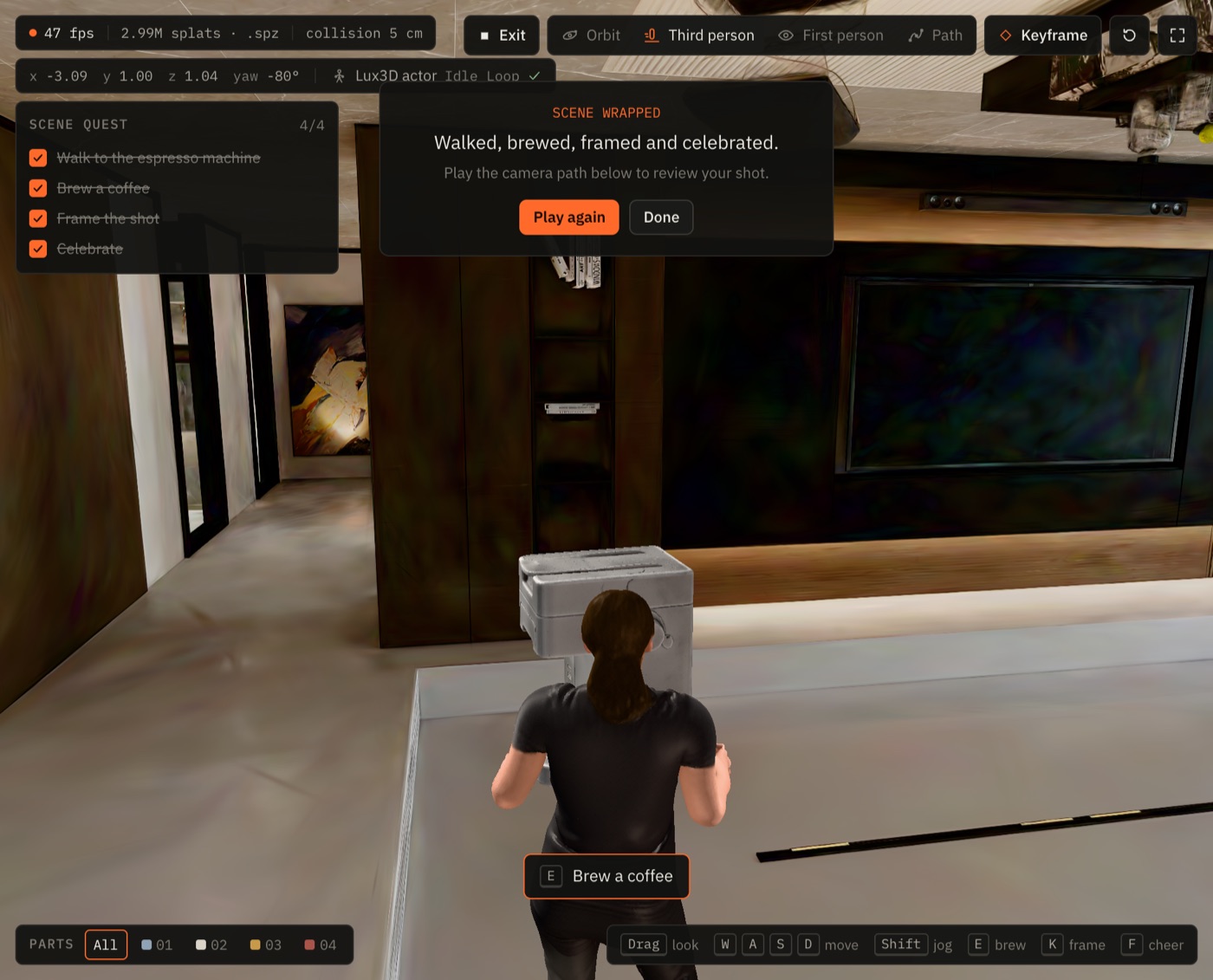
Start from the Play button at the top of the stage, or open /studio?play=1 to start the quest as soon as the world and the actor have loaded. Exit leaves play mode and keeps the camera where it is.点击舞台顶部的游玩按钮开始,或打开 /studio?play=1,世界和角色加载完成后任务会自动开始。点「退出」离开游玩模式,镜头保持在当前位置。
The quest任务流程
- Walk to the espresso machine. The step completes once the actor is within about a metre of it.走到咖啡机旁。角色走到距离咖啡机约一米以内时,这一步即完成。
- Brew a coffee. Press E near the machine. The actor turns to face it and plays
Interact; the camera cuts to a close-up for about three seconds whilehood_top_jointswings the hood up anddrawer_front_jointslides the drawer out, then blends back.冲一杯咖啡。在咖啡机附近按 E。角色转身面向咖啡机并播放Interact;镜头切到约三秒的特写,hood_top_joint把盖子向上翻开,drawer_front_joint把抽屉滑出,随后镜头平滑切回。 - Frame the shot. Press K. The current view is added to the camera path as a keyframe, with a reference frame captured from the canvas.构图取景。按 K。当前视角会作为关键帧加入镜头路径,并附带一张从画布截取的参考帧。
- Celebrate. Press F and the actor plays
Dance_Loop. The quest panel shows “Scene wrapped” with Play again and Done.庆祝。按 F,角色播放Dance_Loop。任务面板显示「本场杀青」,并提供「再玩一次」和「完成」。
Controls操作方式
| Input输入 | Action操作 |
|---|---|
| W A S D | Walk (Walk_Loop)行走(Walk_Loop) |
| Shift | Jog (Jog_Fwd_Loop)慢跑(Jog_Fwd_Loop) |
| Drag拖动 | Look around环顾四周 |
| E | Brew, when the prompt shows next to the machine冲咖啡(在咖啡机旁出现提示时) |
| K | Add the current view as a keyframe把当前视角添加为关键帧 |
| F | Cheer欢呼 |
Outside play mode the same walk keys work in the third- and first-person camera modes, and Q / E change height in orbit and path modes.在游玩模式之外,同样的行走按键在第三人称和第一人称镜头模式下也能用;在环绕和镜头路径模式下,Q / E 用于调整高度。
On phones and tablets手机与平板
- Joystick: a thumb stick appears bottom left in the walk modes. A light push walks, a full push jogs.摇杆:在行走模式下,左下角会出现一个拇指摇杆。轻推为行走,推到底为慢跑。
- Buttons: Brew, Frame and Cheer sit bottom right, standing in for E, K and F.按钮:右下角有「冲咖啡」「取景」「欢呼」三个按钮,分别对应 E、K 和 F。
- Look: drag anywhere else on the stage. The stage uses pointer events with
touch-action: none, so dragging does not scroll the page.视角:在舞台其他任意位置拖动即可。舞台使用 pointer 事件并设置了touch-action: none,拖动时页面不会滚动。
Touch controls show on coarse pointers and on screens up to 900 px wide.触控操作会在粗精度指针设备(如触屏)以及宽度不超过 900 px 的屏幕上显示。
Expand全屏
The Expand button at the right end of the stage toolbar hides the docks, header and timeline and gives the render the whole screen. It uses the browser's fullscreen API where it is allowed and falls back to a fixed full-window stage elsewhere (for example in iOS Safari). Press Esc or the same button to return.舞台工具栏最右侧的全屏按钮会隐藏两侧面板、顶栏和时间轴,让渲染画面占满整个屏幕。浏览器允许时使用全屏 API,否则(例如在 iOS Safari 中)退回为铺满窗口的固定舞台。按 Esc 或再次点击该按钮即可返回。
How it is built实现方式
- The machine is the URDF from
articulationAnimation, assembled at runtime byloadUrdfAssembly. Each frame resets the link transforms and applies the joint values, so brewing is the same code path as the joint sliders on the bench.咖啡机来自articulationAnimation返回的 URDF,运行时由loadUrdfAssembly组装。每一帧都会先重置连杆变换,再应用关节值,因此冲咖啡和测试台上的关节滑块走的是同一条代码路径。 - The actor is one skinned GLB with eight retargeted clips. Clip choice is a small state machine: forced
Interactfor 2 s after brewing andDance_Loopfor 3 s after cheering, otherwise idle, walk or jog from your input.角色是一个带八个重定向动作片段的蒙皮 GLB。播放哪个片段由一个小型状态机决定:冲咖啡后强制播放Interact2 s,欢呼后播放Dance_Loop3 s,其余时间根据你的输入在待机、行走和慢跑之间切换。 - Quest state lives in a ref read by the render loop, and only step changes reach React, so the overlay does not re-render at frame rate.任务状态保存在由渲染循环读取的 ref 中,只有步骤变化才会通知 React,因此浮层不会按帧率重新渲染。