Parts & articulation部件拆分与关节化
lux3d.partSplit breaks a mesh into semantic sub-meshes, and lux3d.articulationAnimation gives it joints from one sentence. Holorra lets you explode, isolate, recolor and hinge the result on the stage.生成的物体应该能拆开,也能动起来。lux3d.partSplit 把网格拆成语义子网格,lux3d.articulationAnimation 用一句话为它加上关节。在 Holorra 的舞台上,你可以对结果做爆炸视图、单独显示、改色,并让铰链动起来。Part split部件拆分
Select the stage prop in the right dock and press Run part split, or send any GLB URL to partSplit from the Lux3D tab. Lux3D returns the parts as separate, unnamed meshes. On the G1 espresso machine (task 8354166) it returned four, with the same 229,788 triangles as the unsplit mesh:在右侧面板中选中舞台道具并点击运行部件拆分,或在 Lux3D 标签页中把任意 GLB URL 发给 partSplit。Lux3D 返回的部件是彼此独立、没有命名的网格。对 G1 意式咖啡机(任务 8354166),它返回了四个部件,三角面总数与拆分前相同,都是 229,788:
| Part部件 | Our reading我们的判读 | Triangles三角面 |
|---|---|---|
part_0 | Main body主体 | 95,310 |
part_1 | Side dial侧面旋钮 | 1,489 |
part_2 | Top section顶部 | 59,340 |
part_3 | Outer shell外壳 | 73,649 |
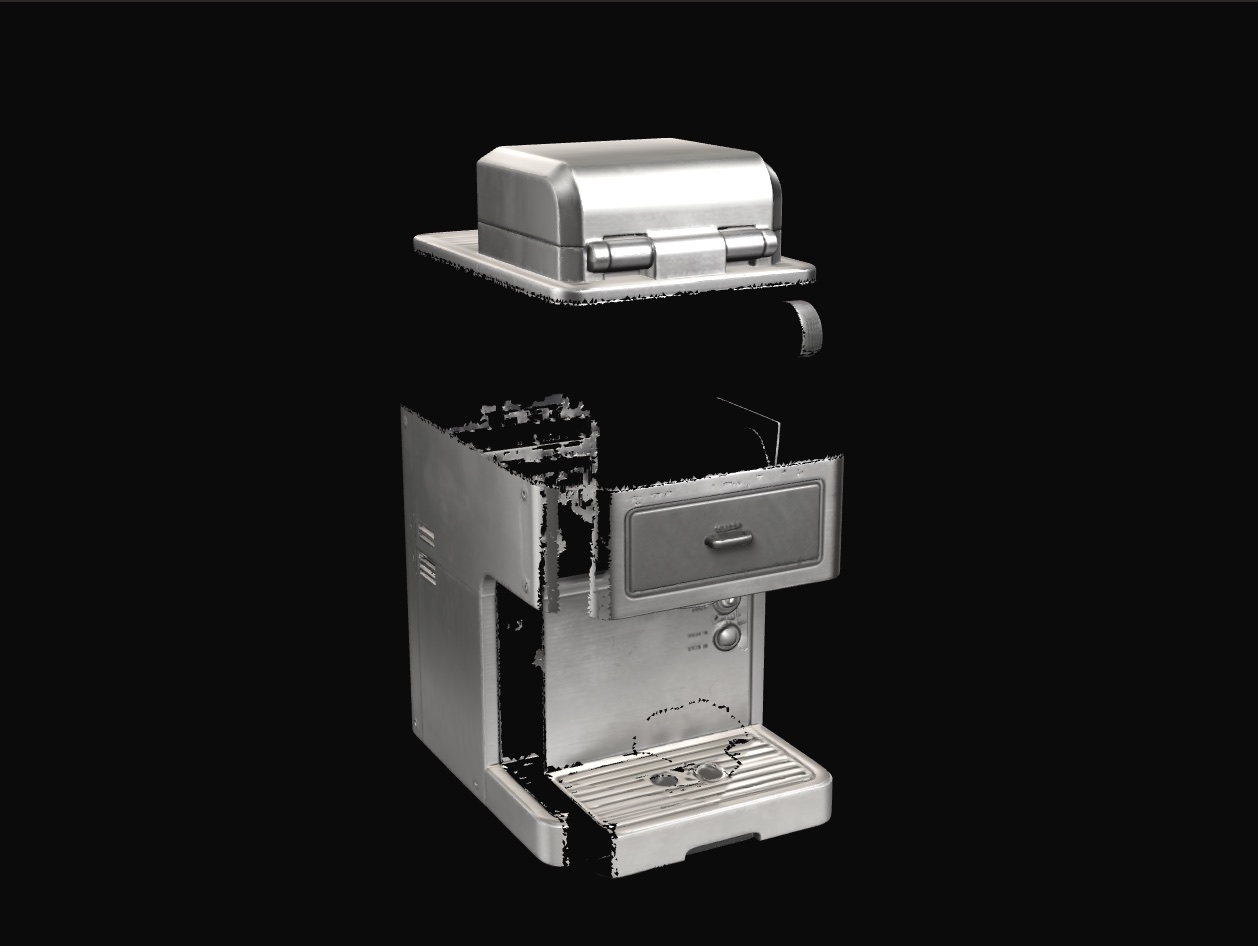
Explode, isolate, recolor爆炸、单独显示、改色
- Explode (0 to 100%) pushes every part away from the model origin along the line through its bounding-box centre. Presets: Closed 0, Inspect 35, Service 65, CAD 100.爆炸视图(0 到 100%):沿模型原点与各部件包围盒中心的连线,把每个部件向外推开。预设:闭合 0、检视 35、检修 65、CAD 100。
- Isolate: click a part on the stage or in the part list to select it; the eye toggles hide and show it.单独显示:在舞台上或部件列表中点击某个部件即可选中;点眼睛图标可隐藏或显示它。
- Recolor: pick a swatch for the selected part to override its material colour on the stage. Reset clears every override.改色:为选中的部件选一个色块,即可在舞台上覆盖它的材质颜色。「重置」会清除所有覆盖。
- Material transfer: the Lux3D tab sends a model and a reference image to
lux3d.materialTransfer.create(versionv3.0-standard) for a new PBR texture set.材质迁移:Lux3D 标签页把模型和一张参考图发送给lux3d.materialTransfer.create(版本v3.0-standard),生成一套新的 PBR 贴图。
Articulation from a sentence一句话完成关节化
Type how the object should move and press Animate from prompt. We asked: “The top brewing hood hinges open upward about its back edge while the front capsule drawer slides out.” Lux3D returned a robot.urdf with one GLB per link (task 8354168, 298 s):输入物体应该如何运动,然后点击按提示词生成动画。我们的提示词是:「The top brewing hood hinges open upward about its back edge while the front capsule drawer slides out.」(顶部冲泡盖沿后缘向上翻开,同时前方胶囊抽屉滑出。)Lux3D 返回了一个 robot.urdf,每个连杆对应一个 GLB(任务 8354168,298 s):
| Joint关节 | Type类型 | Child link子连杆 | Limit范围 | Axis轴 |
|---|---|---|---|---|
hood_top_joint | revolute旋转关节(revolute) | hood_top | 0° – 90° | −x (hinge)−x(铰链) |
drawer_front_joint | prismatic滑动关节(prismatic) | drawer_front | 0 – 0.233 | +z (slide)+z(滑动) |
drawer_handle_joint | fixed固定关节(fixed) | drawer_handle | — | follows drawer随抽屉移动 |
The stage reads that URDF at runtime (src/lib/urdf-assembly.ts), builds the link tree with each joint's origin, and drives the revolute and prismatic joints every frame. While articulation is on, the joints swing through their range; in play mode, brewing opens them.舞台在运行时读取这个 URDF(src/lib/urdf-assembly.ts),按每个关节的原点构建连杆树,并逐帧驱动旋转关节和滑动关节。开启关节动画时,各关节会在活动范围内往复运动;在游玩模式中,冲咖啡会把它们打开。
Export导出
lux3d.multiFormatExport.create converts a result to usdz, fbx_zip, obj_zip, stl or 3mf, for AR Quick Look, game engines and 3D printing. Pick formats in the Export block of the Lux3D tab.lux3d.multiFormatExport.create 可以把结果转换为 usdz、fbx_zip、obj_zip、stl 或 3mf,用于 AR Quick Look、游戏引擎和 3D 打印。在 Lux3D 标签页的「导出」区域选择格式。